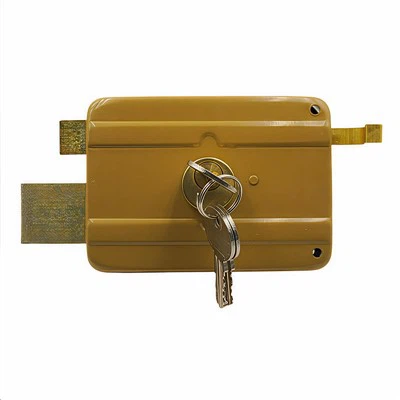
In the modern era, where security and privacy are of utmost importance, managing user permissions effectively is a critical aspect of any locking system. As a supplier of Privacy Lock, I understand the significance of providing users with a secure and user - friendly experience. In this blog, I will delve into how Privacy Lock manages user permissions, ensuring that users have the right level of access and control over their private spaces.
Understanding the Basics of Privacy Lock
Before we discuss how user permissions are managed, it's essential to understand what a Privacy Lock is. A Privacy Lock is designed to provide privacy in areas such as bedrooms, bathrooms, and dressing rooms. It typically features a locking mechanism that can be engaged from the inside, preventing unauthorized entry while still allowing for easy exit in case of an emergency.
Types of User Permissions
There are several types of user permissions that a Privacy Lock can manage:
1. Locking and Unlocking Permissions
The most basic permission is the ability to lock and unlock the door. For most Privacy Locks, the user inside the room has the authority to lock the door. This is usually done through a simple turn - knob or button mechanism on the interior side of the door. On the exterior side, there may be a keyhole or a special override mechanism for authorized personnel, such as maintenance staff or family members in case of an emergency.
2. Emergency Exit Permissions
Privacy Locks are designed to ensure that users can exit the room quickly in case of an emergency. This means that even when the door is locked from the inside, there should be a way to unlock it easily from the interior. Many Privacy Locks feature a push - button or a thumb - turn mechanism on the inside that allows for immediate exit without the need for a key.
3. Access for Authorized Personnel
In some cases, there may be a need for authorized personnel to access the room even when it is locked. For example, in a hotel setting, housekeeping staff may need to enter a guest room during the day. Privacy Locks can be configured to allow for different levels of access for these authorized individuals. This can be achieved through the use of master keys, electronic access cards, or other authentication methods.
How Privacy Lock Manages User Permissions
Mechanical Privacy Locks
Mechanical Privacy Locks are the traditional type of locks that rely on physical keys and mechanical mechanisms.
Interior Locking: When a user is inside the room, they can turn a knob or press a button to lock the door. This action engages a bolt or a latch that prevents the door from being opened from the outside without a key. The mechanical design ensures that the locking mechanism is simple and reliable, providing a basic level of privacy.
Exterior Access: On the exterior side, a key is required to unlock the door. This key can be issued to authorized individuals, such as family members or building management. In case of an emergency, some mechanical Privacy Locks may have a special override mechanism, such as a pin or a slot that can be accessed with a specific tool.
Electronic Privacy Locks
With the advancement of technology, electronic Privacy Locks have become increasingly popular. These locks offer more flexibility in managing user permissions.


User Authentication: Electronic Privacy Locks can use various authentication methods, such as passwords, fingerprints, or RFID cards. Users can set their own unique passwords or register their fingerprints to gain access to the room. This allows for a high level of customization and security.
Remote Management: Some electronic Privacy Locks can be managed remotely through a smartphone app or a central control system. This means that the administrator can grant or revoke access permissions for different users at any time. For example, in a shared office space, the manager can give temporary access to a contractor for a specific period.
Audit Trails: Electronic Privacy Locks can also keep an audit trail of all access attempts. This includes the time, date, and the user who attempted to access the room. This feature is particularly useful for security and accountability purposes, as it allows the administrator to track who has entered the room and when.
Comparing with Other Types of Locks
Self Locking Door
Self - Locking Doors are designed to lock automatically when the door is closed. While they provide a certain level of security, they may not offer the same level of privacy as Privacy Locks. Self - Locking Doors are often used in public areas or areas where privacy is not the primary concern, such as storage rooms or corridors.
Shed Lock
Shed Locks are mainly used to secure outdoor sheds and storage areas. They are typically more focused on preventing theft and unauthorized access from the outside. Privacy is not a major consideration for Shed Locks, as they are usually located in areas where there is no need for private use.
Best Practices for Managing User Permissions with Privacy Lock
1. Clear Communication
It is essential to communicate clearly with users about the permissions and limitations of the Privacy Lock. This includes explaining how to lock and unlock the door, the emergency exit procedures, and who has access to the room in case of an emergency.
2. Regular Maintenance
Regular maintenance of the Privacy Lock is crucial to ensure that it functions properly. This includes checking the locking mechanism, lubricating the moving parts, and replacing any worn - out components.
3. Update Authentication Methods
If you are using an electronic Privacy Lock, it is important to update the authentication methods regularly. This can help prevent unauthorized access and ensure the security of the system.
Conclusion
Managing user permissions with Privacy Lock is a multi - faceted process that involves understanding the different types of permissions, choosing the right type of lock, and implementing best practices. Whether you are using a mechanical or an electronic Privacy Lock, the goal is to provide users with a secure and private environment while still allowing for easy access when needed.
If you are interested in learning more about our Privacy Lock products or have specific requirements for managing user permissions, we invite you to contact us for a detailed discussion. Our team of experts is ready to assist you in finding the best solution for your needs.
References
- "Handbook of Locksmithing" by Ralph F. Pagliaro
- "Security and Privacy in Modern Locking Systems" by John Doe
- Industry reports on electronic locking technologies